Showing posts with label Data Relationship Management. Show all posts

Thursday, 19 March 2015

Did you lose status of previous action scripts execution in DRM

Action script is one of the ways to add and update master data in DRM.

While executing action scripts DRM displays status of each snippet in the action scripts but if you navigate between tabs then DRM will not keep the execution results on the same screen. Don’t get depressed there are still many ways….

Option 1 : Audit and Transaction log will give you in detail what has been updated but these never shows what was there in action script and how many were committed to database and how many were rejected, still it didn’t answer our question, lets check other option.

Option 2 : There is one more Request Type “Jobs” which solves our problem. 


To narrow down the results you can chose Type, Status and of course version if you want.


Since I didn't choose anything in particular so I am getting jobs statuses of every action performed across all versions.


If there is any script execution then status Done will have hyperlink to action script file used and it's status.


This is created using DRM 11.1.2.4 version.

Happy Learning :)


Friday, 13 March 2015

DRM Migration part 1

The approach I am going to explain is little tedious as it requires more manual work, migration accuracy and success dependent on extract from source.

  • Create dummy export in source and make sure you have selected all required properties

  • Create action scripts using output in the above step, DRM executes script by record so less number of records in script ensures good performance.
  • Load System Preference using Migration Utility then restart the services, though restarting service is not mandate for every System Preference change but you can decide if you have list of changes done for System Preferences.

  • Load External Connections using Migration Utility then update the connection details if necessary add new tables.

  • Load the remaining artifacts using Migration Utility.
  • Execute exports and validate the results against source environment.


Happy Learning :)

Thursday, 12 March 2015

How to hide Login screen in DRM

DRM has given the flexibility to hide the login screen through Anonymous profile feature.

Create a profile in DRM application with user id and password through which you want to access DRM (make sure user id mentioned here should have access to DRM with Anonymous privilege) and DRM gives special link to access DRM which is collectively called as Anonymous profile.


Let me show you in detail…

Open DRM Management console.

Select an application.


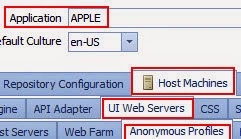
Navigate to Host Machines à UI Web Services à Anonymous profiles.


Add a profile

Provide the user id and password then click on save profile then save configuration


Use below link to access specific application without login screen.

http://localhost/drm-web-client/Logon.aspx?app=APPLICATIONMAE&login=PROFILENAME


Happy Learning :)


Version In DRM disappeared after services restart

I have encountered a situation where Version and Hierarchies we created were washed out after services were restarted.

I believe we didn't commit the changes to database hence after services restart system rollback the changes which were committed earlier so my Versions / Hierarchies got deleted. 
I tried reproducing the issue and I was succeeded.


Let me show you how it works in this post.

Created a version and DON’T SAVE IT


Tick mark in Saved column indicates whether version is saved or not besides you can see Baseline version for saved version.
DRM allows you to create Hierarchies under Saved / Unsaved versions.


Restart the services and see the magic


Version created recently was no longer available.

So it is clear that we must save the version the moment when it creates otherwise it will go away during service restart.

Happy Learning  :)


Tuesday, 10 March 2015

How to perform migration in DRM

Master data and metadata lies in DRM Development instance can be migrated to any other instances of project such as STG, UAT, PROD etc. either way in multiple ways.

DRM Migration utility has given the flexibility to extract project artifacts such as Exports, External connections, Properties etc. and it is common for any approach I show in this blog.

Bottle neck moment in migration is building Hierarchies and populating value for properties.

Approach 1: 
Extract metadata using exports from source environment along with required property values.
Create an action script and execute them in the target environment.

“This approach required your extra attention to make sure you have updated every single required property.”

Approach 2: 
Use In-house methods to migrate metadata from one environment to other environment.
From DRM web console you can take back up of any version from source.
Restore the backup version in target environment.

"This approach requires master data synchronization between source and target environments."

Stay tune to my blog for detail level approaches.

Happy learning J


Monday, 9 March 2015

How to execute batch script without login credentials

Do you think your batch script is unsecured as it is displaying user and its password?

Do you want to hide the user id and password?

Are you loosing actual sense of audit as it might be ambiguous to identity whether the action performed through batch scripts or manual updates with those credentials?

Don’t worry! We have the answer to make your batch script secured…..

Step 1: Open the command prompt in the machine where DRM is installed.

Step 2: Navigate to this path
C:\Oracle\Middleware\EPMSystem11R1\products\DataRelationshipManagement\client\batch-client
Which is pretty famous as our most lovable DRM-batch-client.exe resides in the same directory J

Step 3: Execute drm-batch-client-credentials.exe

Step 4: change the application name by selecting the option 1

Step 5: Once you set the application over which your batch script runs, then go with option 2 to enter the credentials what you were using in batch script, Enter the user id and password and confirm the password.


Step 6: Remove the login credentials from the batch script and save script and then execute it.

Tuesday, 24 February 2015

Problem with Insert command in DRM and its remedy

One of the attribute that make DRM so unique and also made it evolve so drastically is its shared library for hierarchies, as always every system has its down side DRM is no exception for that.
DRM has a feature called flwo through that facilitates user to share the hierarchy from other hierarchy provided both of them should be in the same version.
you have created one hierarchy and updated all the properties for it, now when creating other hierarchy from scratch, DRM says the so and so node already existing in the version so that you can't add but you can insert.
You just need to insert the required hierarchy from the source that reduces your manual effort as well you can keep the consistency across the hierarchies in the version, let me restate same with an example.
Your current hierarchy needs "Resources" sub hierarchy, instead of building it from scratch you can insert it from the source.


Now if you try to remove “Gandhi” in your hierarchy then it will remove even in source hierarchy also since “parent child combination” is same, this causes major issues, When I dug DRM, I found one validation class “PropRemove”, it mandates to enter 3 parameters then Save the validation and assign the validation to the hierarchy.


Here I repeated the same property thrice, if the node I am trying to remove is mapped with the same value of the property (Custom.Expertise_Domain = Hyperion) then it pops up one Error box as below.


You can mention any three properties and respective values which make the differentiation from one to other.


Happy learning :)

Insert does Add functionality in DRM !!!!!


Add action name is self-explanatory; it is used to build the standard hierarchy and Insert to build the alternative or shared hierarchy,


But I experienced one situation where Insert behaves like Add action.

Ex: DRM load is failing when I try to build the alternative hierarchy with the Insert action.


But at last I came up some setting which turns Insert as a special action that is used to build the alternative hierarchy.


Step 1: Go to Hierarchy properties and select System category.


Step 2: Set "Enable Shared Nodes" to True.

Now try with same automator to build the alternative hierarchy, it will show one pop up box with the following message.


And the shared or alternative hierarchy looks like


Happy learning :)

How to restrict the length of string in DRM during export?

Remember it has impact on all the versions in the application
Step 1: Navigate to Administer -> System Preferences

Step 2: Double click “MaxDescr and enter the required length and then save, this restricts the length of Core.Description property.


Creating one Derived property:
Create one derived property by keeping default settings as it is, in the parameter tab keep the below formula

If(Equals(String,SubString(PropValue(Custom.Description-Input),80,1),SubString(PropValue(Custom.Blank),2,1)),SubString(PropValue(Custom.Description-Input),0,79),SubString(PropValue(Custom.Description-Input),0,80))

Note: This property fetches first 80 characters from Description-Input; you must have Blank and Description-Input properties before writing this property. Blank and Description-Input both are defined properties.

Customizing the export:

Step 1: Navigate to the “Target” tab in the exports.
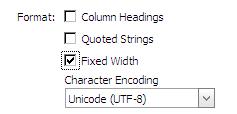
Step 2: Check “Fixed Width” option available in Format group 


Step 3: Specify the required length for each column and save the changes in “Fixed with Options”, the downstream system has to trim the extra spaces besides node name.


Happy learning :)

How to change the general view of nodes in DRM?

Ideally DRM distinguishes the nodes with symbols based on the character like Leaf and Limb.


Limb with Hierarchy symbol, Leaf with Rectangle symbol

In this post I will show how to change symbols associated with the Limb and Leaf nodes based on the relationship.
Steps to be followed:
1) Create two Glyphs each one for Parent and Child.
Glyphs: It behaves like a place holder for symbols.

2) Create two Node Types each one for Parent and Child.
· Select Parent Glyph.
· Assign the required properties to the Node type.
· Save the Node Type.
· Repeat the same for Child.

3) Create one Derived property to identify whether the node is parent or child in the hierarchy, based on the result assign the relevant node type to the node.
if(NodeIsLeaf(Core.Abbrev),Child,Parent))
Property must be mapped to any one of the property category.

4) Go to Hierarchy properties -> System -> Hierarchy Node Type
Assign the newly created derived property and save the changes.

5) Open the hierarchy now you can view the symbols in different view.


Happy learning :)

How to change the default display properties in DRM?

Ideally in DRM you can see the hierarchy in the left pane and properties aligned to the categories in the right pane, sometimes navigation to the required and mandate property become cumbersome if the property category has huge number of properties.


With this post I would like to show how to display Description of the node in the left pane itself, the reason for choosing Description is: It is very common for any hierarchy.
DRM has given wide range of scope to customize many options, One among them is “Default Display Properties” by using you can display the properties next to the node name in the same pane.
Steps to cater the given requirement:
Step 1: Go to Hierarchy properties.
Step 2: Figure out the “Default Display Properties property available in the System property category.
Step 3: Add Core.Name and Core.Description to the above property. (Since we are changing the display properties you need to select the Core.Name and any other properties that you want to display along with the node.)

Step 4: Save the changes and Open the hierarchy.


Happy learning :)

How to change the Hierarchy name in DRM?

Hierarchy represents one Dimension in downstream systems like in Essbase /Planning,
You have provision to update any node name except the hierarchy name manually, but hierarchy name has to change for some reason, then what would be the solution?
Even though it is not possible to update manually but you can achieve that using the automator.


In the above automator change the highlighted fields according to your business requirement.

Note: The version should be unloaded and loaded once to reflect the name changes.

Happy learning :)

What if, the property not mapped to any property category?


Property category is a repository of properties that make sense to your application, it works well even if you don’t map to any category but……


Here I need emphasis on three points


Case 1: You don’t find the property while creating the Export.


Case2: No where you can see the relevant property value for particular node.


Case3:  If a property is not aligned to a property category and if you have access on that particular property category then you will not be able to fetch the values of that property for any node in the environment.

Case4: The property mapped to the relevant category and we created the export and export also went fine


But after some time when I opened the export, it pops me out with below alert


It says either the property has been deleted or unassigned from group, check for these possibilities for the solution.

Happy learning and thanks for all who supported me to write this post :)

Problem with sort order in DRM and its solution

The very first time when you are building new hierarchy, DRM builds the hierarchy either in Alphabetical order or Numerical order.
However you are looking for hierarchy that should not follow either Alphabetical or Numerical order instead DRM should build the hierarchy the way input looks.
This can be done in two steps

Step 1: Create one derived property with the below conditions
Property Type : Derived
Data Type : Sort
Overridable : Uncheck (by default it is checked)
Parameters : PropValue(Core.ID)

Even though DRM follows Alphabetical or Numerical order it creates an ID based on the input file, so if you sort the hierarchy based on ID you will get the required structure.

Make sure the property should be mapped at least one property category.

Step 2: Open the Hierarchy level properties.
              Browse for System property category.
              Locate the Standard Hierarchy Sort label and browse for newly created property and assign.
Now your hierarchy structure will be in your required format.


But when you are creating an alternative hierarchy with defined set of members and pattern, the set is combination of Leaf and Limb members, in this case the above derived formula will not holds good because DRM builds the hierarchy in alphabetical order or numerical order.

Small changes in the system preferences will turn the hierarchy structure around.

Navigate to the System Preferences in Administer tab and open SortLimbsFirst.
Set the value to False and save the changes.


Happy learning and thanks for all who supported to write this post :)


How to retain Original nature of Derived Property

In general Derived property returns value based on the logic implemented but nevertheless it is a reason to say no for exceptional cases where derived value need to be override with other values.

Always business needs takes high priority J

Once derived property override manually (Action scripts / Manual updates) then it will loses its virtue to derive value based on the logic implemented, down the line derived property got the necessary changes and now you are expecting property to derive a value even for the node overridden manually. It is mirage until you perform some cleanup activities L

Let me show you how to do

Here in this example I have created one derived property to get prefix


 But somehow I had to change prefix to EN_


If you observe keenly calculator symbol before the property name is disappeared, the reason is property value has been overridden.

You are just one step before to retain its original nature.

Right click on property name and then click on Remove value to remove manually updated value for that single node, DRM has given flexibility to remove values even through descendants J

Here is the final result

You can achieve same using action scripts as well.
Thanks for reading this post and thanks for all who helped me :)